Which directions a session took the spine, at a glance. How to read the radar chart, what the percentages mean, and what the chart can and can't tell you.
After every session, Remo draws a Spinal Motion chart: a four-pointed radar chart that shows how the session moved your client's spine. Forward, back, twisting, and side bending, at a glance.
Radar charts aren't something most of us read every day, so this post walks through it piece by piece: why the spine's directions are worth watching, how to read a radar chart, how the percentages are calculated, what the chart can't tell you, and how to use it to reflect on your teaching.
What the spinal motion chart is for
The Spinal Motion chart is a quick check of which directions the session took the spine. It's not a measure of mobility or a graded score. It answers one question: of the exercises in this session, how many rounded the spine, arched it, twisted it, or bent it to the side?
That's useful in two ways:
Right after a session, it tells you whether the spinal work matched what you planned.
Across weeks, it tells you whether one direction keeps getting left out.
Why spinal motion is worth tracking in Pilates
Joseph Pilates, Return to Life Through Contrology (1945)
"If your spine is inflexibly stiff at 30, you are old. If it is completely flexible at 60, you are young."
Pilates was built for a spine that moves well in every direction, and a full Pilates repertoire has exercises for each of them.
The chart uses the four directions you already teach:
Flexion: rounding forward, as in the Hundred, Short Spine, or Short Box Round Back.
Extension: arching back, as in Swan or Pulling Straps.
Rotation: twisting, as in Spine Twist or Short Box Twist.
Lateral Flexion: side bending, as in Mermaid or Short Box Side Stretch.
In the moment, it's easy for one direction to take over. Flexion especially: so much of the typical choreography rounds forward that a session can lean that way without anyone deciding it should. The chart makes that visible.
How to read a radar chart
A radar chart puts several categories on spokes around a center, then plots one value on each spoke. Remo's has four spokes, one per direction of spinal motion: Flexion at the top, Rotation on the right, Extension at the bottom, and Lateral Flexion on the left.
The center is zero. A point sitting on the center means no exercise in the session moved the spine that way.
Each spoke is one direction of spinal motion: Flexion, Rotation, Extension, and Lateral Flexion.
Further out means more of the session. Each point sits at that direction's share of the exercises. Join the four points and you get the session's shape.
The outer ring fits the session's biggest number, not 100%. Read the percentages listed under the chart to compare one session with another.
The balanced session from later in this post, drawn the way Remo draws it. The numbered points match the list beside the chart.
The shape is the part to read first. A spike toward one spoke means the session leaned heavily that way. A rounder, more even shape means the session spread its spinal work across directions. A spoke with no shape along it means that direction didn't come up at all.
The rings are there to give the shape some scale, but they rescale for every session: the outer ring is sized to fit that session's biggest number. A session with 30% flexion and a session with 70% flexion can both reach the edge. That's why Remo lists the four percentages under the chart. Use the shape for the balance within one session, and the numbers to compare one session with another.
How the spinal motion percentages are calculated
Like the muscle heat map, the Spinal Motion chart is built entirely from the session's exercise list. Remo builds that list from the words you say while you teach, and tags each exercise with the directions of spinal motion it works. An exercise can have one direction, several, or none.
Each percentage is the share of the session's exercises tagged with that direction. In a ten-exercise session where three exercises round the spine forward, Flexion reads 30%.
The exercise list
FootworkNo spinal motion
HundredFlexion
Short Box Round BackFlexion
Short Box Side StretchLateral Flexion
Short Box TwistRotation
SwanExtension
Pulling StrapsExtension
MermaidLateral Flexion
Spine TwistRotation
ElephantFlexion
Share of the 10 exercises
Flexion3 of 1030%
Rotation2 of 1020%
Extension2 of 1020%
Lateral Flexion2 of 1020%
Ten exercises. Each direction's percentage is the share of those ten that moved the spine that way. Footwork keeps the spine neutral, so it counts in the total but adds to no direction, and the four numbers come to 90%.
Two things follow from that, and both surprise people:
The four numbers don't add up to 100%. Exercises with a neutral spine, like Footwork, still count in the total, so they pull every percentage down a little.
One exercise can count twice. An exercise tagged with both rotation and lateral flexion adds to both, so the numbers can also add up to more than 100%.
If a tag looks wrong, you can change it. Open the session, tap Review on the Exercises card, and choose Just muscles & spinal motion. The chart reflects whatever you save.
How the spinal motion chart credits anti-rotation and other resisted motion
The spine doesn't have to move for a direction to count. Resisting motion in a direction is spinal work too: the trunk is holding the spine still while something pulls it toward a twist, a side bend, a forward round, or a sag.
Anti-rotation: holding the spine square against a load that pulls from one side, as in single-arm work on the Reformer.
Anti-lateral flexion: holding the spine long against a sideways pull, as in Side Plank or Side Kick Kneeling.
Holding against a forward or backward pull: in Chest Expansion, the spine doesn't move, but your client is strengthening the muscles that extend it, so it counts as Extension. In a plank or Long Stretch, gravity pulls the low back toward a sag and the abdominals hold it level, so it counts as Flexion.
In each case the muscles are doing real work in that direction. The spine just doesn't end up moving. So you can choose to credit the direction the working muscles would move the spine, even when it stays still. For twisting and side bending, that's the same spoke as the pull. Front to back, it's the opposite one.
Remo already does this when it builds the exercise list: anti-rotation work is tagged Rotation, Side Plank is tagged Lateral Flexion, Chest Expansion is tagged Extension, and a plank is tagged Flexion. When it isn't clear from the exercise or from what you said, Remo leaves the tag off.
Whether to credit resisted motion is your call. Some instructors want the chart to show only where the spine actually moved; others want it to show every direction the trunk worked in. Either is a valid way to look at your teaching. What matters is staying consistent, so one session compares fairly with the next. You can add or remove tags under Review, then Just muscles & spinal motion.
The spinal motion chart counts directions, not range or quality
A long Flexion spoke means many of the session's exercises rounded the spine. It doesn't mean your client rounded deeply, or well. The chart doesn't know how far your client moved, how many reps they did, or whether they articulated bone by bone or moved as one block.
Every exercise also counts once, however long it lasted. A quick set of Spine Twist and a long, slow Mermaid each count once.
Read it as "how often did this session take the spine this way," not "how mobile is this spine." Range, control, and quality are still yours to see.
How to use the spinal motion chart in your teaching
Check whether the spinal work matched your intention
You usually walk into a session with a plan for the spine: warm up into flexion before Teaser, bring in extension for a client who sits all day, keep rotation gentle for a sore back. Right after, glance at the chart and compare it with that plan.
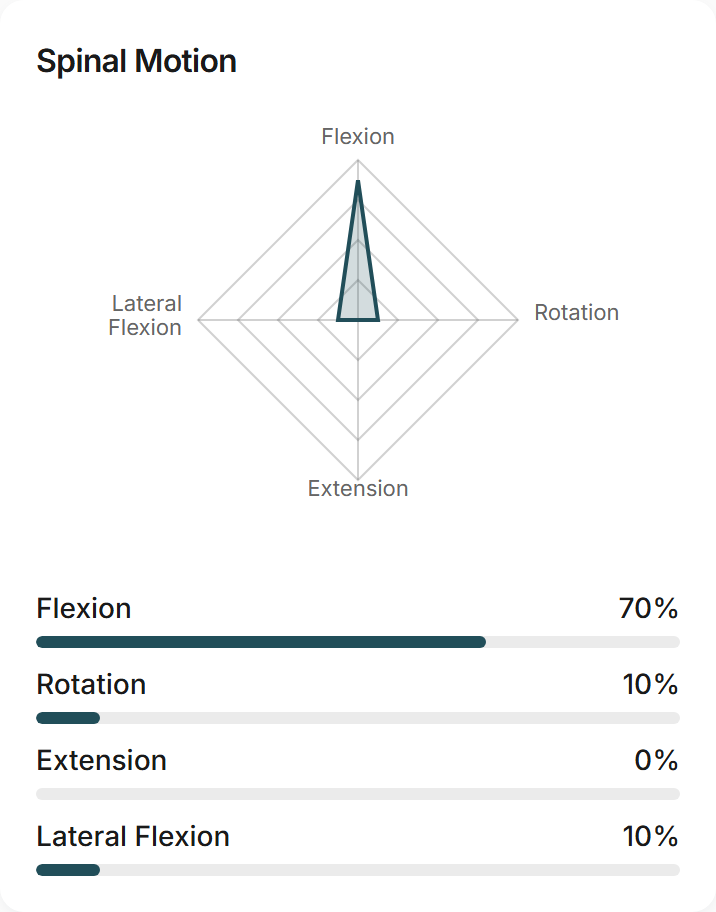
A session built around flexion
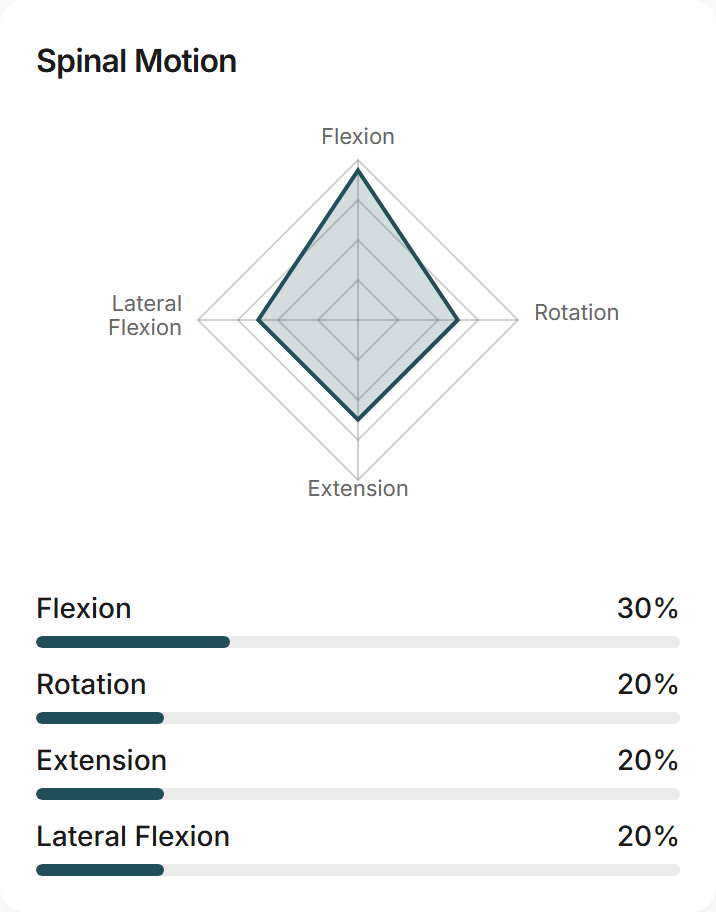
A session that moves the spine in every direction
Two real Spinal Motion cards from Remo. The first is mostly rounding forward with no extension at all; the second spreads the spine across all four directions. Either one can be exactly the session you meant to teach.
If it doesn't match, there are a few possible explanations: the session needed to change once your client walked in, an exercise is tagged in a way you don't agree with, or the plan didn't come through the way you intended. All of them are useful reflections on the session you taught.
There's no single right shape
A balanced diamond isn't the goal, and a spike isn't a mistake. A client with osteoporosis may be avoiding loaded flexion on purpose. A client training for a golf season may need more rotation than someone with back pain. A session building toward Teaser will lean into flexion.
The chart shows you what happened. Whether that was the right session is your call, and it's always a reflection, never a verdict.
Spot a direction you've been skipping
One session can lean any way it needs to. Over weeks, though, the choices you make on the day add up, and a direction can quietly drop out of a client's sessions without you ever deciding it should. Under Session History on the client page, each session has its own small spinal motion bars, so you can look back across sessions in chronological order and see whether extension, say, hasn't shown up in a month.
What the spinal motion chart can and can't tell you
It is an at-a-glance view of which directions a session moved the spine, built from the exercise list.
It is a way to check a session against your plan.
It is a way to notice a direction that keeps getting skipped.
It isn't a measure of range, depth, control, or how mobile your client is.
It isn't a target. There's no shape every session should have.
It isn't a recommendation. It doesn't tell you what to teach next. You decide that.
Spinal motion chart FAQ
What does the spinal motion chart show in a Pilates session?
How the session moved the spine. Remo's Spinal Motion chart has four directions (Flexion, Extension, Rotation, and Lateral Flexion) and shows what share of the session's exercises moved the spine each way, as a radar chart with the percentages listed underneath.
How do you read a radar chart?
Each spoke is one category, and the center is zero. The further out the point on a spoke, the bigger that category's number. Join the points and the shape tells you the balance at a glance: a spike toward one spoke means one category dominated, and a rounder shape means the numbers were closer together.
Why don't the spinal motion percentages add up to 100%?
Because each direction is counted on its own. A percentage is the share of the session's exercises that moved the spine that way. Exercises with a supported spine, like Footwork, count in the total without adding to any direction, and an exercise that both twists and side bends counts toward both.
Does anti-rotation count as rotation on the spinal motion chart?
It can. Resisting motion in a direction is spinal work too, so Remo credits the direction the working muscles would move the spine: anti-rotation work is tagged Rotation, Side Plank is tagged Lateral Flexion, Chest Expansion is tagged Extension, and a plank is tagged Flexion. Whether to count resisted motion is your choice: edit the tags under Review, Just muscles & spinal motion, and keep the same approach from session to session so the chart compares fairly.
Is a bigger shape on the radar chart better?
Not necessarily. The rings rescale to fit each session's biggest number, so a shape can reach the edge at 30% or at 70%. Compare sessions using the percentages listed under the chart, and use the shape to see the balance within one session.
Does the chart show how far my client moved?
No. The chart counts which directions the session's exercises moved the spine, not how far, how many times, or how well your client articulated. Your eyes and your client's feedback tell you about range and quality.
What's the right balance of flexion, extension, rotation, and lateral flexion?
There isn't one. A session built around flexion can be exactly right for one client and day, and a session that spreads the spine across all four directions can be right for another. The chart shows you what the session did so you can compare it with what you meant to do.
Can I change the spinal motion tags on an exercise?
Yes. Open the session, tap Review on the Exercises card, and choose Just muscles & spinal motion. The chart updates to match what you save.
Stop teaching from blurred memory.
Remo listens while you teach and turns each session into notes, per client, so you walk in knowing exactly where you left off.