Teach present.
Remember everything.
Remo listens as you teach, quietly building exercise lists, client notes, and progress insights so you can focus on your client, not your notebook.
By your seventh client, last week's session is a blur.
You can't remember which spring, which cue landed, or what you did five sessions ago. You didn't get into teaching to be a filing cabinet.
A quiet partner in
every session.
Remo listens in the background, understands what you're teaching, and turns it into the notes you'd write after class, if only you had the time.
New Session
Maya R.
Tap to Start Recording
By starting the recording you are confirming you have consent to record all participants.
Start recording and forget it.
One tap before you teach. Remo records audio during the session and you teach how you normally do. No more writing notes from memory after your client walks out.
A one-to-one session begins. The screen reads New Session with a client's name, and a single round button underneath says Tap to Start Recording. The button is pressed and the screen switches to Recording: a running timer and the controls for Add Note, Pause and End Session. The timer climbs. Nothing is typed and nothing is tapped.
A session summary is open, with a card headed Exercises and a count that starts at zero. Four exercises land in the list one at a time, and the count goes up with each. Each row carries the exercise name, the time it happened, the apparatus, colored dots for the springs, the setup note, and pills for the primary and secondary muscle groups. By the end the card reads Exercises, four.
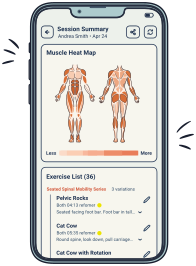
A card headed Muscle Heat Map shows a front and a back view of the body, grey to start. As each exercise from the session is counted in, the matching areas warm from pale peach to deep orange: the fronts of the thighs and lower legs first from footwork, then the inner thighs, then the abs and arms once the Hundred is added, and finally the obliques and outer thighs from side overs on the short box. A Less to More scale sits underneath.
A card headed Spinal Motion holds a four-point radar chart, its corners labelled Flexion, Rotation, Extension and Lateral Flexion, with a bar and a percentage for each one listed beside it. All four start at zero and climb as the session is counted in. Flexion pulls furthest out, finishing at seventy-two percent, while extension reaches thirty-four, rotation twenty-eight and lateral flexion eighteen, so the finished shape leans heavily to one side.
A progress map for the goal Hiking without knee pain. A band across the top reads Stairs ached on the left and Six miles, no flare on the right, above a completion ring at thirty-four percent. Underneath are two column labels: Then, January, and Now, April. Before-and-after rows appear one at a time, Single-leg work, Step up front and Stairs, each with a status pill and a then on the left and a now on the right, while the completion ring climbs with them, finishing at seventy-six percent.
A session summary is open: a Session Theme card reading Full Body Flow, an Exercises card counting twenty-seven, the Muscle Heat Map, and the top of the Spinal Motion card, with a Share button in the page header. Tapping Share slides up a sheet headed Share Session Summary, already filled in: every section the session has is ticked, and the client's email address is in the Send to field. The address is replaced with a colleague's, Exercise setup notes is ticked on as well because setup notes are written for whoever teaches next, and a short personal note is typed underneath. Send Email becomes Sending, and a notice slides down from the top reading Summary sent, and the address it went to.
Complete session notes
in minutes, not hours.
One flat price for solo practitioners who teach primarily private sessions.
For individual instructors. Every feature, one flat price.
- ✓ Unlimited session recording
- ✓ Auto-generated exercise lists
- ✓ Client profiles & history
- ✓ Muscle heat map & spinal motion map
- ✓ Progress analysis over time
- ✓ Sub briefs for covering instructors
- ✓ Priority support
Publish classes online? See Remo Creator
Train instructors? See Remo Educator
Put the notebook down.
Be there, fully.
Every client feels like your only client.